Timeout warning
Status: ExperimentalHow to use ‘experimental’ components
Contents
Overview
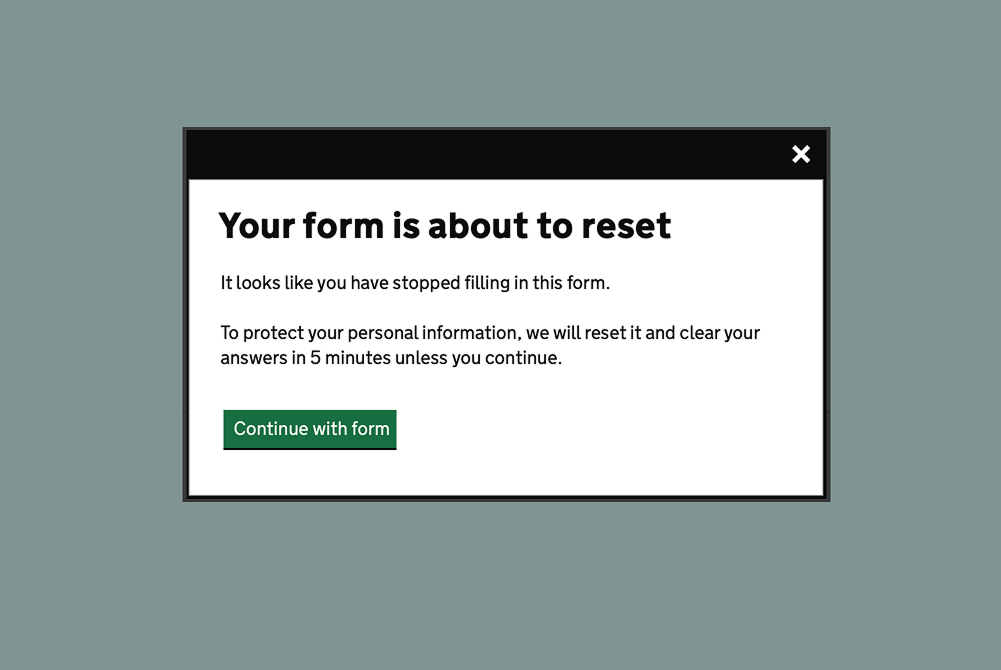
The component uses the modal dialog component to show a timeout warning to inform users when they have a limited amount of time to complete their current activity. The modal contains a button which allows users to extend the time they have to complete the task. This is important because whenever a process has a time restriction of less than 20 hours to complete a process users must be given a way to turn off, adjust, or extend the time limit in order to satisfy WCAG SC 2.2.1 Timing Adjustable (Level A).
After a configurable amount of time without user interaction, the timeout warning modal will show. This will display a countdown of the time remaining. The modal contains a button that when pressed will make a request to a URL which will extend the length of their session (this behaviour needs to be developed in the backend of the application). If no action is taken before the end of the countdown, the user will be redirected to another page. This page should explain to the user that their session has been ended to keep their data secure, and that they will need to restart the process.
The component works with screenreaders, announcing the time remaining every 15 seconds up until the final 20 seconds which will be announced every second.
How the component is currently used
The component is used within forms published using the MOJ Forms platform. For data security sessions are limited to 30 minutes per page. The timeout warning shows after 25 minutes, giving users a 5 minute window to extend their session before their session is ended and their data cleared.
Contribute to this component
You can help develop this component by adding information to the ‘timeout warning’ Github discussion. This helps other people to use it in their service.
A Figma link was not included when this component was added.
There may be more information in the ‘timeout warning’ Github discussion. You can also view the component image in the overview.
Contribute a Figma link
If you have a Figma link for this component (or a component like it) you can add it to Github discussion. This helps other people to use it in their service.
Accessibility findings have been added for this component. There may be more findings in the ‘timeout warning’ Github discussion.
External audit
- Conducted by: User Vision
- Date: 24 July 2023
Audit findings
There’s an issue when content is added using the data-timer-extra-text attribute after the timer countdown. The content is hidden from screenreaders and not announced. This counts as a WCAG fail.
However if the aria-hidden attribute is removed from this content it’ll then be announced on every update of the timer, which would not be a good user experience.
To resolve this issue you need to do one of the following:
- adjust the content of the warning modal to not need the additional content
- adapt the code to fix the duplicated announcement
Assistive Technology testing
Date: 15 April 2023
Testing details
The component was tested with keyboard and screenreaders. No issues were discovered.
Contribute accessibility findings
If you have accessibility findings that are relevant to this component you can add them to the Github discussion. This helps other people to use it in their service.
Code has been added for this component. There may be other code blocks in the ‘timeout warning’ Github discussion.
Code block 1: HTML
    <body>
       <div class="govuk-modal-dialogue-inert-container">
         <div class="govuk-timeout-warning-fallback">
            Your session will be reset at <TIMESTAMP>. This is to protect your data.
         </div>
         <!-- all your page content here -->
       </div>
       <div class="govuk-timeout-warning" data-module="govuk-timeout-warning">

          <div class="govuk-modal-dialogue" data-inert-container=".govuk-modal-dialogue-inert-container">
             <div class="govuk-modal-dialogue__wrapper" >
               <dialog class="govuk-modal-dialogue__box" aria-labelledby="modal-title" aria-modal="true" role="modal" tabindex="-1">
                 <div class="govuk-modal-dialogue__header">
                   <button type="button" class="govuk-button govuk-modal-dialogue__close" aria-label="close" data-element="govuk-modal-dialogue-close">x</button>
                 </div>
                 <div class="govuk-modal-dialogue__content">
                   <h2 class="govuk-modal-dialogue__heading govuk-heading-l" id="modal-title">Title</h2>
                   <div class="govuk-modal-dialogue__description govuk-body">
                     <div class="govuk-timeout-warning__timer" aria-hidden="true"></div>
                     <div class="govuk-timeout-warning__at-timer govuk-visually-hidden" role="status" id="at-timer"></div>
                   </div>
                 </div>
               </dialog>
             </div>
             <div class="govuk-modal-dialogue__backdrop"></div>
           </div>

         </div>
       </body>
How to use the code
For situations where javascript may fail or not be present, there is a fallback element. This should contain a time when the session will end, so the the user is aware of their time restriction.
The timeout warning makes use of the modal dialog component.
The warning dialog must be places outside of the .govuk-modal-dialogue-inert-container element.
Code block 2: JavaScript
    import ModalDialog from './modal-dialog.js'

    function TimeoutWarning($module) {
      this.$module = $module
      this.$dialog = $module.querySelector('.govuk-timeout-warning__dialog')
      this.$fallbackElement = document.querySelector('.govuk-timeout-warning-fallback')
      this.modalDialog = new ModalDialog(this.$dialog).init({
        onClose: this.dialogClose.bind(this),
        onDialogNotSupported: this.dialogFallback.bind(this),
      })
      this.timers = []
      // UI countdown timer specific markup
      this.$countdown = $module.querySelector('.govuk-timeout-warning__timer')
      this.$accessibleCountdown = $module.querySelector('.govuk-timeout-warning__at-timer')
      // UI countdown specific settings
      this.idleMinutesBeforeTimeOut = $module.getAttribute('data-minutes-idle-timeout') ? $module.getAttribute('data-minutes-idle-timeout') : 25
      this.timeOutRedirectUrl = $module.getAttribute('data-url-redirect') ? $module.getAttribute('data-url-redirect') : 'timeout'
      this.extendSessionUrl = $module.getAttribute('data-url-extend') ? $module.getAttribute('data-url-extend') : 'extend'
      this.minutesTimeOutModalVisible = $module.getAttribute('data-minutes-modal-visible') ? $module.getAttribute('data-minutes-modal-visible') : 5
      this.timerText = $module.getAttribute('data-timer-text') ? $module.getAttribute('data-timer-text') : 'Your session will be reset in '
      this.timerExtraText = $module.getAttribute('data-timer-extra-text') ? $module.getAttribute('data-timer-extra-text') : ''
      this.timerRedirectText = $module.getAttribute('data-timer-redirect-text') ? $module.getAttribute('data-timer-redirect-text') : 'You are about to be redirected'
    }

    // Initialise component
    TimeoutWarning.prototype.init = function() {
      // Check for module and dialog
      if (!this.$module || !this.modalDialog) {
        return
      }

      // Start watching for idleness
      this.countIdleTime()

      if (window.history.pushState) {
        this.disableBackButtonWhenOpen()
      }
    }

    // Count idle time (user not interacting with page)
    // Reset idle time counter when user interacts with the page
    // If user is idle for specified time period, open timeout warning as dialog
    TimeoutWarning.prototype.countIdleTime = function() {
      var debounce
      var idleTime
      var milliSecondsBeforeTimeOut = this.idleMinutesBeforeTimeOut * 60000

      // As user interacts with the page, keep resetting the timer
      window.onload = resetIdleTime.bind(this)
      window.onmousemove = resetIdleTime.bind(this)
      window.onmousedown = resetIdleTime.bind(this) // Catches touchscreen presses
      window.onclick = resetIdleTime.bind(this) // Catches touchpad clicks
      window.onkeypress = resetIdleTime.bind(this)
      window.onkeyup = resetIdleTime.bind(this) // Catches Android keypad presses

      function resetIdleTime() {
        if (!this.isDialogOpen()) {
          // As user has interacted with the page, reset idle time
          clearTimeout(idleTime)
          clearTimeout(debounce)

          function idleTimer() {
            this.extendTimeOnServer();
            idleTime = setTimeout(this.openDialog.bind(this), milliSecondsBeforeTimeOut)
          }

          debounce = setTimeout(idleTimer.bind(this), 3000);
        }
      }
    }

    TimeoutWarning.prototype.openDialog = function() {
      this.modalDialog.open();
      this.startUiCountdown()

      if (window.history.pushState) {
        window.history.pushState('', '') // This updates the History API to enable state to be "popped" to detect browser navigation for disableBackButtonWhenOpen
      }
    }

    TimeoutWarning.prototype.dialogFallback = function() {
      this.$fallbackElement.style.display = 'block'
    }

    // Starts a UI countdown timer. If timer is not cancelled before 0
    // reached + 4 seconds grace period, user is redirected.
    TimeoutWarning.prototype.startUiCountdown = function() {
      this.clearTimers() // Clear any other modal timers that might have been running
      var $module = this
      var $countdown = this.$countdown
      var $accessibleCountdown = this.$accessibleCountdown
      var minutes = this.minutesTimeOutModalVisible
      var timerRunOnce = false
      var timers = this.timers
      var seconds = 60 * minutes

      $countdown.innerText = minutes + ' minute' + (minutes > 1 ? 's' : '');

      (function runTimer() {
        var minutesLeft = parseInt(seconds / 60, 10)
        var secondsLeft = parseInt(seconds % 60, 10)
        var timerExpired = minutesLeft < 1 && secondsLeft < 1

        var minutesText = minutesLeft > 0 ? '<span class="tabular-numbers">' + minutesLeft + '</span> minute' + (minutesLeft > 1 ? 's' : '') + '' : ' '
        var secondsText = secondsLeft >= 1 ? ' <span class="tabular-numbers">' + secondsLeft + '</span> second' + (secondsLeft > 1 ? 's' : '') + '' : ''
        var atMinutesNumberAsText = ''
        var atSecondsNumberAsText = ''

        try {
          atMinutesNumberAsText = this.numberToWords(minutesLeft) // Attempt to convert numerics into text as iOS VoiceOver ccassionally stalled when encountering numbers
          atSecondsNumberAsText = this.numberToWords(secondsLeft)
        } catch (e) {
          atMinutesNumberAsText = minutesLeft
          atSecondsNumberAsText = secondsLeft
        }

        var atMinutesText = minutesLeft > 0 ? atMinutesNumberAsText + ' minute' + (minutesLeft > 1 ? 's' : '') + '' : ''
        var atSecondsText = secondsLeft >= 1 ? ' ' + atSecondsNumberAsText + ' second' + (secondsLeft > 1 ? 's' : '') + '' : ''

        // Below string will get read out by screen readers every time the timeout refreshes (every 15 secs. See below).
        // Please add additional information in the modal body content or in below extraText which will get announced to AT the first time the time out opens
        var text = document.createElement('p')
        var timerText = document.createTextNode($module.timerText)
        text.appendChild(timerText);

        var countdown = document.createElement('span');
        countdown.setAttribute('class', 'countdown');
        countdown.innerHTML = ' ' + minutesText + secondsText + '.'
        text.appendChild(countdown);

        var atText = $module.timerText + ' ' + atMinutesText
        if (atSecondsText) {
          if (minutesLeft > 0) {
            atText += ' and'
          }
          atText += atSecondsText + '.'
        } else {
          atText += '.'
        }

        if ($module.timerExtraText) {
          var extraText = document.createElement('p')
          extraText.innerText = $module.timerExtraText
        }

        if (timerExpired) {
          $accessibleCountdown.innerText = $module.timerRedirectText
          setTimeout($module.redirect.bind($module), 1000)
        } else {
          seconds--

          $countdown.innerText = ''
          $countdown.appendChild(text)
          if (extraText) $countdown.appendChild(extraText)

          if (minutesLeft < 1 && secondsLeft < 20) {
            $accessibleCountdown.setAttribute('aria-live', 'assertive')
          }

          if (!timerRunOnce) {
            setTimeout(() => { // Ensures text is read out just after modal opens
              $accessibleCountdown.innerText = atText + ' ' + $module.timerExtraText
              timerRunOnce = true
            }, 1000)
          } else if (secondsLeft % 15 === 0) {
            // Update screen reader friendly content every 15 secs
            $accessibleCountdown.innerText = atText
          }

          // JS doesn't allow resetting timers globally so timers need to be retained for resetting.
          timers.push(setTimeout(runTimer, 1000))
        }
      })()
    }

    TimeoutWarning.prototype.saveLastFocusedEl = function() {
      this.$lastFocusedEl = document.activeElement
      if (!this.$lastFocusedEl || this.$lastFocusedEl === document.body) {
        this.$lastFocusedEl = null
      } else if (document.querySelector) {
        this.$lastFocusedEl = document.querySelector(':focus')
      }
    }

    // Set focus back on last focused el when modal closed
    TimeoutWarning.prototype.setFocusOnLastFocusedEl = function() {
      if (this.$lastFocusedEl) {
        window.setTimeout(function() {
          this.$lastFocusedEl.focus()
        }, 0)
      }
    }


    TimeoutWarning.prototype.isDialogOpen = function() {
      return this.modalDialog.isOpen();
    }

    TimeoutWarning.prototype.dialogClose = function() {
      if (!this.isDialogOpen()) {
        this.clearTimers()
        this.extendTimeOnServer();
      }
    }

    // Clears modal timer
    TimeoutWarning.prototype.clearTimers = function() {
      for (var i = 0; i < this.timers.length; i++) {
        clearTimeout(this.timers[i])
      }
    }

    export default TimeoutWarning
How to use the code
The behaviour of the component is set using data-attributes. The following attributes can be set (default values are shown in square brackets):
data-minutes-idle-timeout[25] - number of minutes of inactivity before modal is showndata-minutes-modal-visible[5] - number of minutes the modal is shown for (length of countdown)data-url-redirect[timeout] - url that the user is redirected to if there is no interactiondata-url-extend[extend] - url that a GET request will be sent to when user requests more timedata-timer-text[Your session will be reset in] - text preceding the countdown, announced every time the countdown updates for screenreader usersdata-timer-extra-text[This is to protect your data] - text following the countdown, will only be read oncedata-timer-redirect-text[You are about to be redirected] - text announced to screenreader users just prior to redirection
Initialise the timeout warning as follows
 const $timeoutWarning = document.querySelector('[data-module="govuk-timeout-warning"]');
     new TimeoutWarning($timeoutWarning).init()
Code block 3: CSS
    .js-enabled .govuk-timeout-warning-fallback {
      display: none;
    }

    .countdown {
      white-space: nowrap;
    }

    .tabular-numbers {
      @include govuk-font($size: false, $tabular: true)
    }
How to use the code
You will also need the modal dialog styles.
Contribute code for this component
If you have code that is relevant to this component you can add it to the Github discussion. This helps other people to use it in their service.