Copy button
Status: ExperimentalHow to use ‘experimental’ components
Contents
Overview
This simple ‘copy button’ component allows users to quickly and accurately copy important information — for example dates of birth, reference numbers and National Insurance numbers — with a single click. A similar pattern exists in the GOV.UK Design System as a secondary CTA, but this version has been adapted to work accessibly within panels and interruption card components. This functionality is not currently available in the MoJ Design System, and there is a demonstrated user need for it. The pattern has been tested with users and received strong positive feedback.
How the component is currently used
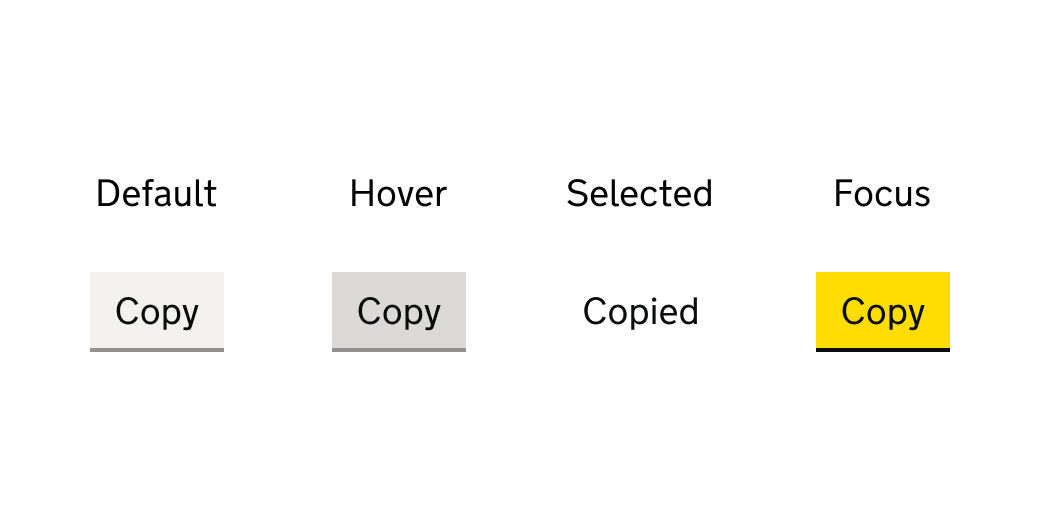
The default state of this component follows the GOV.UK secondary CTA style, with the label ‘Copy’. On hover, the button background darkens to the standard GOV.UK hover grey. When the user clicks, the button enters its focus state with the GOV.UK focus yellow, and the label changes to ‘Copied’. The button background also adapts to match the background of the component it sits within (for example a summary card, panel, or interruption card), improving accessibility when used on coloured backgrounds. The non-interactive ‘Copied’ state lasts for 4 seconds before returning to the default state.
Contribute to this component
You can help develop this component by adding information to the ‘copy button’ Github discussion. This helps other people to use it in their service.
Designs
A Figma design has been added for this component. There may be more links and resources in the ‘copy button’ Github discussion.
Figma
If you work for MOJ, view the ‘copy button’ component in the MOJ Figma Kit.
If you work outside MOJ, go to the MOJ Figma Kit on the Figma community platform.
Contribute prototypes and Figma links
If you have design files that are relevant to this component you can add them to the Github discussion. This helps other people to use it in their service.
Accessibility findings have been added for this component. There may be more findings in the ‘copy button’ Github discussion.
Internal review
- By: LAA Apply and review team
- Date: 29 July 2025
Review findings
During exploration using Figma plugins to do the accessibility checks only this component had passed the Accessibility: WCAG contrast guidelines on the coloured background. One of the concerns raised was by external team member that The button’s position on the far right might be missed by users who are zoomed in, so we may want to bring it closer to the content. However the copy button is in a summary card with a line outlining the row, this line is often enough prompt for users who are zoomed in. This positioning is how things are done with change links on check your answer pages and on summary list and cards in the GOV design system. Based on this the component passes the WCAG guidelines.
Contribute accessibility findings
If you have accessibility findings that are relevant to this component you can add them to the Github discussion. This helps other people to use it in their service.
Code
Code has been added for this component. There may be other code blocks in the ‘copy button’ Github discussion.
Code block 1: HTML
    <span id="copy-alert" class="govuk-visually-hidden" aria-live="polite"><span>
    <p>Your application reference is: <span id="reference-number">A12-345-X</span>
    <button class="govuk-button govuk-button--secondary copy-button" id="copy-reference-number">Copy reference</button>
    </p>
Code block 2: CSS
    // Hide copy text links if Javascript is disabled
    .copy-button { display: none }

    body.js-enabled {
      .copy-button { display: inline }

      @media print {
        .copy-button { display: none }
      }
    }

    .disable-click {
      pointer-events: none;
      background-color: transparent;
      box-shadow: none;
    }
Code block 3: JavaScript
    /**
    * @param {string} textElementId - Id of the element whose text will be copied
    * @param {string} copyElementId - Id of the copy button element
    * @param {string} screenReaderAlertText - text that will be added into live region for screen reader users
    * @param {string} originalCopyText - original text of copy button element
    **/
    function copyText(textElementId, copyElementId, screenReaderAlertText, originalCopyText = 'Copy') {
      let textElement = document.querySelector(textElementId);
      let copyElement = document.querySelector(copyElementId);
      let screenReaderAlert = document.getElementById("copy-alert");

      if (textElement && copyElement) {
        copyElement.addEventListener('click', (e) => {
          e.preventDefault();

          let text = textElement.textContent.trim();
          window.navigator.clipboard.writeText(text);
          screenReaderAlert.textContent = screenReaderAlertText;
          copyElement.classList.add('disable-click');
          copyElement.textContent = "Copied";

          setTimeout(() => {
            screenReaderAlert.textContent = "";
            copyElement.classList.remove('disable-click');
            copyElement.textContent = originalCopyText;
          }, 4000);

          copyElement.blur();
          return true;
        });
      }
    }

    copyText('#reference-number','#copy-reference-number', 'Reference copied', 'Copy reference')